Rio Mar Service Desk Training

Learn to file a ticket that gets fixed fast

Aprende a poner un ticket que se resuelva rápido

Three short parts: read the guide, watch a two minute walkthrough, then answer six questions. It takes about ten minutes and this page remembers where you got to.

Son tres partes cortas: lee la guía, mira un video de dos minutos y contesta seis preguntas. Toma unos diez minutos y la página recuerda dónde te quedaste.

Read the guideLee la guía Categories, guest Wi-Fi, how to write a good subject Categorías, Wi-Fi de huéspedes y cómo escribir un buen asunto
Watch the walkthroughMira el video Two real tickets, one English and one Spanish Dos tickets reales, uno en inglés y uno en español
Take the quizToma la prueba Six questions in Microsoft Forms, five of six to pass Seis preguntas en Microsoft Forms; necesitas cinco de seis

You can go to the portal at any time. Finishing the training just means you will file better tickets and get them back faster.

Puedes entrar al portal cuando quieras. Terminar el adiestramiento solo sirve para que pongas mejores tickets y te los resuelvan más rápido.

Read this first, then you are done in ten minutes

Lee esto primero, y en diez minutos terminas

Three parts: read the guide, watch a two minute walkthrough, then take a short quiz in Microsoft Forms. About ten minutes in total, and this page keeps your place.

Tres partes: lee la guía, mira un video de dos minutos y toma una prueba corta en Microsoft Forms. Unos diez minutos en total, y la página te guarda el sitio.

Signing in the first time

Cómo entrar la primera vez

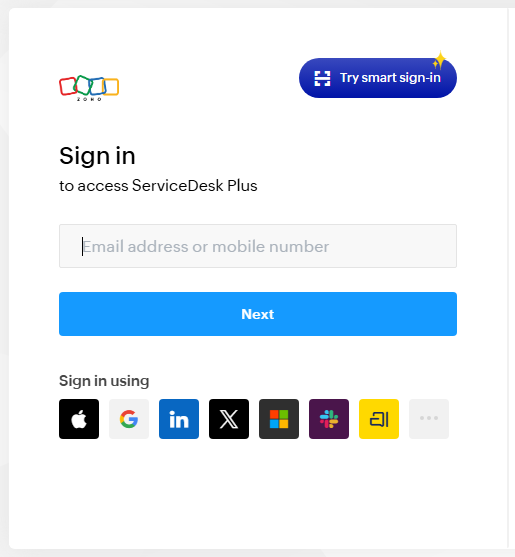
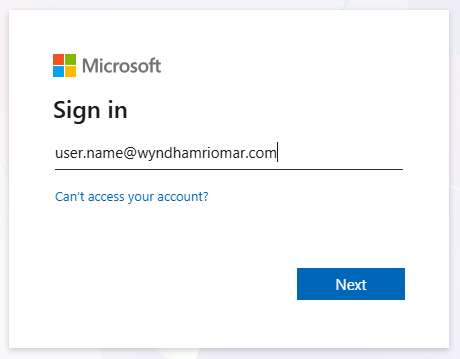
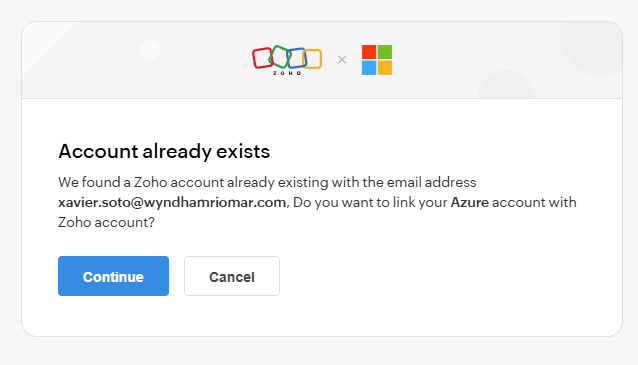
You do not create a password for the Service Desk. It uses your Rio Mar Microsoft account, the same one that unlocks your computer and your email.

No tienes que crear una contraseña para el Service Desk. Se entra con tu cuenta Microsoft de Rio Mar, la misma con la que prendes tu computadora y abres tu correo.

Keep this page beside you while you sign in Deja esta página al lado mientras entras

In Chrome or Edge, right-click the portal address below and choose Open link in split screen window. The guide stays on the left and the Service Desk opens on the right, so you can follow each step without flipping between tabs.

En Chrome o Edge, haz clic derecho en la dirección del portal que aparece abajo y escoge Open link in split screen window. La guía se queda a la izquierda y el Service Desk abre a la derecha, para que sigas los pasos sin estar cambiando de pestaña.

Don’t see that option? Open it in a new tab instead — everything here works the same either way.

¿No te sale esa opción? Ábrelo en una pestaña nueva; funciona igual.

Where things live

Dónde va cada cosa

From the portal home, click Request. You get ten cards. The small grey text under each name is what tells you where your problem belongs, so read that rather than just the title.

En el portal, dale a Request. Te salen diez tarjetas. El texto gris debajo de cada nombre es lo que te dice dónde va tu problema, así que léelo en vez de guiarte solo por el título.

CategoryCome here forNote
CategoríaPara qué sirveNota
Access & AccountsPasswords, sign-in problems, permissions, shared mailboxes, application access.
Access & AccountsContraseñas, problemas para entrar, permisos, buzones compartidos y acceso a programas.
Business Applications & POSRestaurant, reservation, finance and other business systems. Silverware, Birchstreet, Clover, Opera Cloud accounting, and more.
Business Applications & POSSistemas de restaurante, reservaciones, finanzas y otros. Silverware, Birchstreet, Clover, Opera Cloud de contabilidad, entre otros.
Cybersecurity & Security SystemsYou clicked a link you think was phishing, you suspect your account is compromised, or a message or request looks suspicious. Also covers key control and managed device security.Report immediately
Cybersecurity & Security SystemsLe diste clic a un enlace que crees que era phishing, sospechas que te cogieron la cuenta, o te llegó un mensaje o una petición que se ve rara. También cubre el control de llaves y la seguridad de los equipos.Repórtalo enseguida
E-MailEmail sign-in, verification, shared mailboxes, distribution lists.
E-MailEntrar al correo, verificación, buzones compartidos y listas de distribución.
Guest Technology & Property SystemsGuest-room technology, televisions, keys, building systems, Opera front desk and housekeeping.
Guest Technology & Property SystemsEquipos de las habitaciones, televisores, llaves, sistemas del edificio, Opera de front desk y Housekeeping.
Hardware & DevicesComputers, monitors, printers, mobile devices, accessories.
Hardware & DevicesComputadoras, monitores, impresoras, celulares y tabletas, y accesorios.
Network, Wi-Fi & VPNVPN access and remote connections. Guest Wi-Fi does not belong here.Goes to SNA
Network, Wi-Fi & VPNAcceso a VPN y conexiones remotas. El Wi-Fi de huéspedes no va aquí.Va para SNA
Phones & CommunicationsDesk phones, extensions, voicemail, radios, conference calls, Avaya, Zello.
Phones & CommunicationsTeléfonos de escritorio, extensiones, voicemail, radios, llamadas en conferencia, Avaya y Zello.
Software, Reporting & IntegrationsSoftware requests, reports, shared data, automated processes, connected systems.
Software, Reporting & IntegrationsPedir programas, informes, data compartida, procesos automáticos y sistemas conectados.
Other IT SupportAnything that does not match the others. The safety net.
Other IT SupportCualquier cosa que no encaje en las demás. Es la opción de respaldo.

Guest Wi-Fi goes to Safety NetAccess

El Wi-Fi de huéspedes va para Safety NetAccess

Guest internet is run by Safety NetAccess, not by our Service Desk. A guest Wi-Fi complaint filed as a ticket will sit and wait. Get the guest to SNA instead, because they troubleshoot with the guest directly.

El internet de los huéspedes lo maneja Safety NetAccess, no nuestro Service Desk. Si pones un ticket por Wi-Fi de huésped, se queda ahí esperando. Mejor comunica al huésped con SNA, porque ellos lo resuelven directamente con la persona.

Do not file a Service Desk ticketNo pongas un ticket en el Service Desk

What SNA handles

Qué atiende SNA

  • Cannot connect in the room
  • Login portal will not load
  • Slow or dropping connection
  • Device will not authenticate
  • Connecting a game console, streaming stick or smart TV
  • Any problem specific to one device
  • No se puede conectar desde la habitación
  • La página para conectarse no carga
  • Conexión lenta o que se cae
  • El equipo no acepta la clave
  • Conectar una consola de juegos, un streaming stick o un smart TV
  • Cualquier problema de un equipo en específico

What you do

Qué haces tú

First choiceLo primero

Transfer the guest to SNA so they can work through it live.

Transfiere al huésped con SNA para que lo resuelvan en el momento.

If you cannot right nowSi no puedes en ese momento

Give the guest the number and let them call SNA themselves. Better that than asking them to wait.

Dale el número al huésped para que llame él mismo. Es mejor eso que dejarlo esperando.

Contact

Contacto

Guest supportSoporte a huéspedes
1 (888) 636-5212

From a house phone, ext. 5400, then options 1, 1, 7

Desde un teléfono de la propiedad, ext. 5400, y luego las opciones 1, 1, 7

Email
helpdesk@safetynetaccess.com

Game consoles always go to SNA. A guest connecting a PlayStation, Xbox, Switch or similar device has to speak with SNA themselves. Do not try to solve it at the desk.

Las consolas de juegos siempre van para SNA. Si un huésped quiere conectar un PlayStation, Xbox, Switch o algo parecido, tiene que hablar él mismo con SNA. No trates de resolverlo en el front desk.

Keep the ticket number. If you email rather than call, SNA generates a ticket and sends back a number. Write it down and note it on the guest record, because every follow-up refers to it.

Guarda el número de ticket. Si escribes por correo en vez de llamar, SNA abre un ticket y te envía un número. Apúntalo y déjalo en el registro del huésped, porque todo el seguimiento se hace con ese número.

Two worked examples

Dos ejemplos hechos

Write your ticket in English or in Spanish, whichever you are comfortable with. The desk reads both. What matters is that it is specific, not which language it is in.

Escribe tu ticket en inglés o en español, como te sientas más cómodo. En el Service Desk leen los dos. Lo que importa es que sea específico, no en qué idioma está.

English · Cannot sign in

Inglés · No puede entrar

“I’m locked out of the front desk PC.”

Request › Access & Accounts › Computer Sign-In / Locked out / Password Reset › Computer Sign-In - Locked Out or Password Reset

Locked out of front desk PC FD-02 after password change

Your computer login and your email are the same account. Use this one form for either, so you do not need the E-Mail category for a sign-in problem.

Tu cuenta de la computadora y la del correo son la misma. Usa este mismo formulario para cualquiera de las dos; no tienes que ir a la categoría de E-Mail.

Spanish · Something is broken

Español · Algo está dañado

“La impresora del front desk no imprime.”

Request › Hardware & Devices › Hardware & Devices Request

Impresora Ricoh del front desk sin conexión, no imprime tarjetas de registro

Printers, monitors, laptops, mobile devices and accessories all start here. Two clicks, straight to the form. Our printers are Ricoh, so say so and name where it is.

Impresoras, monitores, laptops, celulares y accesorios empiezan todos aquí. Dos clics y llegas al formulario. Nuestras impresoras son Ricoh, así que dilo y di dónde está.

Requesting system access

Pedir acceso a un sistema

New access, changed access, removed access or temporary access all run through Access & Accounts › Systems Access Request. The ticket needs a completed SAR form attached.

Acceso nuevo, cambio de acceso, quitar acceso o acceso temporero: todo se pide por Access & Accounts › Systems Access Request. Al ticket hay que adjuntarle el formulario SAR lleno.

Download the Rio Mar SAR form and fill it in before you start the ticket, so you can attach it in one pass. It is also linked from Useful Links on the portal home.

Baja el formulario SAR de Rio Mar y llénalo antes de empezar el ticket, para que lo adjuntes de una vez. También está en Useful Links en el portal.

Pick the right sub-type once you are in: New Access, Change Access, Remove Access or Temporary Access.

Escoge el tipo correcto cuando entres: New Access, Change Access, Remove Access o Temporary Access.

Download the SAR formBajar el formulario SAR

Write the subject like a technician has forty of them

Escribe el asunto pensando que el técnico tiene cuarenta más

Because they do. A vague subject sits in the queue and a specific one gets picked up. Name the thing, where it is, and what changed.

Porque los tiene. Un asunto que no dice nada se queda en la fila; uno específico lo cogen primero. Di qué es, dónde está y qué cambió.

Sits in the queueSe queda en la fila

Computer sign-in issue

Too vague to act on. It describes every sign-in ticket ever filed.

No dice lo suficiente para empezar. Podría ser cualquier ticket de acceso de los que llegan.

Gets picked upLo cogen primero

Locked out of front desk PC FD-02 after password change

Names the machine, the location and the likely cause. A technician can start before reading further.

Dice cuál computadora, dónde está y qué lo causó. El técnico puede empezar sin leer más nada.

What to put in the description

Qué poner en la descripción

Each form gives you a grey prompt. Answer it, then add anything below that applies. The two lines people leave out most often are impact and workaround, and those are the two that set your ticket’s place in the queue.

Cada formulario trae una nota en gris. Contéstala y añade lo demás que aplique. Lo que más se le olvida a la gente es decir a quién afecta y si hay una solución temporera, y son justo las dos cosas que deciden tu lugar en la fila.

  • Your department or team affected
  • What you were trying to do when it broke
  • The exact error message, or attach a screenshot
  • Computer name, terminal or location such as FD-02, lobby
  • How many people are affected, just you or the whole shift
  • Guest or operational impact, meaning are guests waiting
  • When it started, as close as you can
  • What you already tried, and any workaround in place
  • Tu departamento o el equipo afectado
  • Qué estabas haciendo cuando falló
  • El mensaje de error exacto, o adjunta una captura de pantalla
  • Nombre de la computadora, terminal o área, por ejemplo FD-02, lobby
  • A cuánta gente afecta, si es solo a ti o a todo el turno
  • Si afecta al huésped o la operación, o sea, si hay huéspedes esperando
  • Desde cuándo pasa, lo más cerca que puedas
  • Qué ya intentaste, y si tienes alguna solución temporera

Choosing a priority honestly

Escoger la prioridad con honestidad

Every ticket marked critical makes real emergencies harder to see. Be straight about impact and the queue works for everyone.

Cada ticket marcado como crítico hace más difícil ver las emergencias de verdad. Sé honesto con el impacto y la fila funciona para todos.

P1 CriticalCrítico

Guests or revenue are stopped right now. Check-in is down, or the POS cannot take payment.

Los huéspedes o el ingreso están detenidos ahora mismo. El check-in no funciona o el POS no puede cobrar.

P2 HighAlto

A core system is failing with no workaround, and it is about to affect guests.

Un sistema importante está fallando, no hay cómo darle la vuelta y está por afectar a los huéspedes.

P3 MediumMedio

Broken, but you have a way around it. One printer down with another nearby.

Está dañado, pero puedes seguir trabajando. Una impresora fuera de servicio y otra cerca.

P4 LowBajo

Minor or cosmetic. A request that can wait for the normal queue.

Algo menor o de apariencia. Puede esperar en la fila normal.

Part 1 of 3Parte 1 de 3

When you have read the guide, mark it and move on. You can come back to it any time.

Cuando termines de leer la guía, márcala y sigue. Puedes volver cuando quieras.

Watch the walkthrough

Mira el video

Two real requests logged in the portal, one in English and one in Spanish. Nothing was submitted. There is no audio, so just watch what goes into the subject and description.

Dos tickets reales puestos en el portal, uno en inglés y uno en español. No se envió ninguno. No tiene audio, así que fíjate en lo que se escribe en el asunto y en la descripción.

1:49No audioSin audio

Part 2 of 3Parte 2 de 3

Watch it through, then mark it and move on.

Míralo completo, márcalo y sigue.

Six quick questions

Seis preguntas cortas

The quiz opens in Microsoft Forms. It is marked automatically and recorded against your Rio Mar account, so there is nothing to send us afterwards.

La prueba abre en Microsoft Forms. Se corrige sola y queda registrada bajo tu cuenta de Rio Mar, así que no tienes que enviarnos nada después.

What to expect

Qué esperar

  • Six questions, about two minutes
  • You need 5 of 6 to pass
  • Good and bad subject lines, guest Wi-Fi, priority, phishing
  • Your score and your name are recorded for you
  • If you miss, just take it again
  • Seis preguntas, como dos minutos
  • Necesitas 5 de 6 para aprobar
  • Asuntos buenos y malos, Wi-Fi de huéspedes, prioridad y phishing
  • Tu nota y tu nombre quedan registrados solos
  • Si no la pasas, la tomas otra vez
Open the quizAbrir la prueba

Opens in a new tab. Close that tab when you finish and you will be right back here.

Abre en una pestaña nueva. Ciérrala cuando termines y vuelves aquí mismo.

Part 3 of 3Parte 3 de 3

Take the quiz, then come back and press I finished the quiz so this page stops reminding you.

Toma la prueba, vuelve y dale a Ya terminé la prueba para que la página deje de recordártelo.